Thursday, June 23, 2011

برنامج لنقل الملفات بين الحاسوب والـ أي فون 4‏


برناج خاص بنقل الملفات من الكمبيوتر الى  جهاز iphone 4  الحاص بك نقل ملفات الافلام ، الموسيقى ، البرامج التلفزيونية ، البودكاسيت ، يو أي توينز ،الرنات ، الكتب السمعية ،الصور ، المذكرات الصوتية ، الرسائل المصورة والاتصالات وغيرها وبشكل  كامل .. بامكانك عدم القلق من فقدان ملفاتك برنامج متوافق مع الاصادرات العالي لكافة اي فون

Monday, June 6, 2011

XMSeBuddy XMS انتهى عصر الواتس اب

خدمة BB الان على الايفون باسم جديد XMSeBuddy XMS يستعين باتصالك بشبكة الانترنت لإرسال الرسائل القصيرة بهذهالسرعة وبدون تحديد حجم الملفات التي ترسلها مع هذه الرسائل، وهذا يعني انك تستطيع كذلك تبادل الرسائل القصيرة المجانية دون حصر أو قيود عبر تطبيق eBuddy XMS.
 من مزايا التطبيق:
-  تطبيق يتمتع بالاستقرار بغضالنظر عما ترسله هل هو نص أم صورة
-  تستطيع متابعة الرسالة التي بعثتها هل وصلت وهل قرأها المتلقي
-  اخبر أصدقاءك بهذا التطبيق وستحصل على أكثر من 100 إيقونة للوجوه الضاحكة مجانا.
يذكر أن هذا التطبيق متاح حاليا لأجهزة الايفون والايبود تاتش وكذلك أجهزة الاندرويد بينما سيصبح متاحا في القريب العاجل لأجهزة بلاك بيري.
يعمل على أجهزة الايفون والايبود تاتش.
نظام تشغيل ملائم: iOS 3.0 أو أحدث .
مناسب: لجميع الاجيال.
التحميل:

Saturday, April 23, 2011

الغاء ابراج الاتصالات قريبا

كشف أدولفو هرنانديز رئيس ''الكاتيل لوسنت'' في أوروبا والشرق الأوسط وإفريقيا عن أن سوق الاتصالات في السعودية ستستقبل خلال الفترة المقبلة أحدث تقنيات الربط اللاسلكي في العالم والمعتمدة على تقنية ''لايت راديو''، التي يمكن من خلالها إنهاء وجود أبراج الاتصالات فوق المساكن، وفي الطرق بشكل نهائي، من خلال الاستعاضة عنها بجهاز لا يتجاوز حجم كف اليد. وقال هرنانديز في حوار خاص أجرته معه ''الاقتصادية'' خلال زيارته قبل يومين للعاصمة السعودية الرياض إن ''الكاتيل لوسنت''، وقعت الشهر الماضي مع إحدى شركات الاتصالات في المملكة لتطبيق هذه التقنية الجديدة، التي ستكون السوق السعودية واحدة من ضمن أوليات الأسواق ليس في المنطقة فحسب، بل على مستوى العالم التي تطبقها.
وأضاف ''أعتقد أنه في القريب العاجل سيكون هناك جيل رابع في المملكة، حيث لا يكون هناك استخدام للأبراج اللاسلكية فوق المساكن، ولها مميزات بالطبع في مجال الصحة العامة وحماية البيئة، وهذه التكنولوجيا خاصة بشركة الكاتيل فقط''. وقال رئيس ''ألكاتيل لوسنت'' في أوروبا والشرق الأوسط وإفريقيا إن السوق السعودية في مجال تقنية الاتصالات هي من أبرز أسواق المنطقة، وإن السبب الرئيسي وراء ذلك هو التوجه والإنفاق الحكومي في هذا الصدد، الذي أعده ركيزة أساسية لجعل التطبيقات التقنية في مجال الاتصالات في المملكة تحظى باهتمام الشركات العالمية

Saturday, April 9, 2011

Total Doc Converter 2.2.178 لتحويل الوورد الى اي صيغه


برنامج Total Doc Converter لتحويل الوورد

برنامج مميز جدا لتحويل صيغ الوورد DOC أو DOCX الى الكثير من الصيغ مثل بي دي اف PDF أو صفحات ويب HTML أو صور أو ملفات نصية txt
يدعم البرنامج تحويل الوورد الى الصيغ التالية PDF, Excel, HTML, JPEG, TIFF, RTF, Text


Convert Doc to PDF, HTML, XLS, Image and Text easily

Total Doc Converter solves the problem of converting Doc, DocX, DocM, RTF or TXT files to HTML, PDF, XLS, JPG, TIFF, or Text.
Besides, Total Doc Converter can also convert RVF files (Rvf to PDF, Excel, HTML, JPEG, TIFF, RTF, Text). The program is handy and powerful.
Transparent interface makes it easy even for a beginner to figure out how it works. In fact you don't even have to launch the program.
Total Doc Converter can seamlessly integrate into Windows, which means that you can just select the file on your desktop, make a right button click and press convert to. Besides, there is command line support. It is quite helpful for those who want to launch Total Doc Converter from within other programs. Note that Shape & Image Box option is not supported.
Total Doc Converter is very practical when you have to convert thousands of files. Use Batch converting option to convert hundreds of files and the process won't take you long. Download it now for free and make sure it's the best doc conversion solution.
The latest version of Total Doc Converter supports DocX (the format of Word 2007 documents). Having installed this Microsoft Office Compatibility Pack you can convert DocX files to HTML, PDF, XLS, JPG, TIFF, TXT with Total Doc Converter.
We have also added several options to deal with fonts: now you can define the output font name, font size and font style (bold, underline, italic, strike out). For the perfectly neat output we also added WordWrap option. Use it if you do not want the lines in your document wrap.
Complete list of supported conversions
Doc to: PDF, HTML, XLS, Jpeg, Tiff, Text.
RTF to: PDF, HTML, XLS, Jpeg, Tiff, Text.
DocX to: PDF, HTML, XLS, Jpeg, Tiff, Text.


Thursday, March 31, 2011

Zoner Photo Studio 13.0.1.6 Professional


Zoner Photo Studio helps you acquire, organize and browse through your photos while enhancing the pictures with a variety of additional useful information. You can also convert and edit images and apply a broad range of photo effects using the photo editor.
Take control of your digital photos with Zoner Photo Studio. Acquiring photos from your camera, your scanner, and even your screen has never been easier. Have fun organizing and browsing through your digital memories. With Zoner Photo Studio, you’ll be editing and personalizing your photos with special effects and even advanced functions like HDR processing. Wow your family and friends with 3D photos and impressive panoramas! Process RAW files conveniently and easily with an interface designed specially for photo enthusiasts.
Whether you are sharing pictures with your family and friends or publishing to web galleries, Zoner Photo Studio has the tools for you. Many options are available to help you organize and store your photos on external drives, DVDs, and other media. You’ll benefit from full support for SSE and MMX processor technologies and powerful multi-core processors. 16-bit color depth ensures you get the highest photo quality, and the color management support is outstanding!

OS : Win XP/2000/Vista/Win 7
Language : English

Wednesday, March 23, 2011

اصنع نسختك الاكترونيه من كتبك ومؤلفاتك بنفسك Jutoh 1.27


من اليوم اصنع نسختك الاكترونيه من كتبك ومؤلفاتك بنفسك. هو تطبيق متقدم وموثوق به يمكنك من انشاء الكتب الأكترونيه بالصيغ المتعارف عليها والمنتشره بين الناس والتي يمكن بيعها في العديد من المواقع الأكترونيه. يدعم هذا البرنامج النصوص والية تنسيقها وكيفية اضافة أنماط  لفقره مخصصه وتحديد حدود لكل فقره أو نص أو صفحه والكثير من الخصائص المتاحه. كما يمكنك البرنامج من تضمين الملفات الموجوده على الجهاز والتي يدعمها نظام أوفيس وفتحها واستعراضها مع امكانية التعديل عليها ، كما يمكن تظمين ملفات صفحات الويب أو حتى كتب الكترونيه موجوده مسبقا وفتحها واستعراضها والتعديل عليها. يمنح البرنامج امكانية اختيار غلاف معين للكتاب وتخصيص تنسيقات معينه لذلك. لهذا البرنامج بالذات الكثير من المميزات والخصائص التي لا يمكن ذكرها وايجازها انها كثيره ومميزه تميز هذا البرنامج عن غيره.

Friday, March 11, 2011

أداة مصممة لتحسين سرعة واستقرار جهاز الكمبيوتر


هو أداة مصممة لتحسين سرعة واستقرار جهاز الكمبيوتر الخاص بك عن طريق تحسين التخزين ، واستعادة الذاكرة وضبط إعدادات النظام. والتحسين الذاتي لذاكرة من ما يجعلها مناسبة للمستخدمين المبتدئين والمتوسطين وأيضا قوية ومرنة لخبراء الكمبيوتر.ويساعك على عمل نسخ احتياطية من الإعدادات للنظام التشغيل ويستخدم الحد الأدنى من الموارد المادية للحاسوب ، والتقليل من استخدام الذاكره العشوائية وتحسين ادائها من خلال تقسم الاعمال على الذاكرة واستغلالها الاستغلال الامثل 
وبذلك لا تقلق مهما كانت ذاكرة حاسوبك قليلة مع هذا البرنامج يساعدك على تحسين استخدمها واستغلالها كاملا بدون بطء على حاسوبك وايضاً الميزة التلقائية يقوم في فحص نظام التشغيل الخاص بك وصيانته من الاخطاء وتحسين اداء الحاسوب

CachemanXP is a Windows tuneup utility designed to improve the speed and stability of your computer by optimizing caches, recovering RAM and fine tuning a number of system settings. Oneclick-Optimization makes it suitable for novice and intermediate users yet it is also powerful and versatile enough for computer experts. Backups of settings ensure that all user modifications can be reversed with a single click. CachemanXP requires Windows 2000/2003 or XP/XP64 to run, uses minimal resources and virtually no CPU time. The help file includes a screenshot based system performance guide.

Kaspersky 2011


من أقوى برامج مكافحة الفايروسات , حائز على جوائز عدة من عدة مجلات و مراكز ابحاث , اصبح الان مع ميزات عديدة منها الحمايه ضد ملفات التجسس و حمايتك اثناء تصفح المواقع 
البرنامج لا يحتاج الي تعريف لأن معظم مستخدمي الكمبيوتر و الانترنت يستخدمونه


A Dynamic Link Library (DLL)


A Dynamic Link Library (DLL) is a file of code containing functions that can be called from other executable code (either an application or another DLL). Programmers use DLLs to provide code that they can reuse and to parcel out distinct jobs. Unlike an executable (EXE) file, a DLL cannot be directly run. DLLs must be called from other code that is already executing.
In more understandable words, a DLL is a file which does a particular job, and allows other programs to use its efforts in assisting the program's job. Some programs use a DLL so that they won't need to spend time figuring out how to do that job. For example, Microsoft has a DLL comctl32.dll which does all the user interface jobs (toolbars, text boxes, scroll bars, etc). So, other programs use that DLL so they won't have to create their own edit boxes, etc. When a program requires a DLL to run, and can't find it, it won't be able to run because its suddenly missing the DLL to perform some of its critical work. We've all used DLLs before and we're using them now. They're required to run all Windows programs, including Windows but you never actually see them at work. There are different versions of the same file name. Just because the file appears to be the same doesn't mean it is. To check what version the file is, open Windows Explorer, locate the file and right click on it. Select Properties and click on the Version tab If there is no version tab then the file does not have a version number. Generally, if you have a newer version of a file, don't replace it with an older version.

Thursday, March 10, 2011

برنامج Ashampoo Photo Commander 9.1.0 Final متحدي جديد للفوتوشوب


برنامج Ashampoo Photo Commander 9.1.0 Final متحدي جديد للفوتوشوب ... بل يتعدى الفوتوشوب في إمكانات كثيرة ...وجد لحل هذه المشكلة و هي إن أجهزة الكمبيوتر في عصرنا الحاضر مليئة بالصور و بملفات الفيديو و بالملفات الصوتية مع العديد من الصيغ المختلفة و من العديد من المصادر المختلفة بحيث إن إدارة كل تلك الملفات و متابعتها قد يكون صعبا جدا و قد تحتاج لإستعمال عدة برامج مختلفة - واحد لتنظيم الملفات ، و آخر لمشاهدة الصور و واحد لعرض ملفات الفيديو و واحد آخر للإستماع إلى الملفات الصوتية و فوق ذلك واحد آخر لتحرير الصور و آخر لعمل ألبومات صور و هكذا.. فهو يعتبر مركز التحكم لكل تلك الملفات سواء ملفات الوسائط مثل الصور أو ملفات الفيديو أو الملفات الصوتية . بالأضافة إلى القدرة على أدارة كافة تلك الملفات إما بالعرض أو بالإستماع أو بالتحرير أو بالتعديل أو بغير ذلك ، حيث يوفر عليك الوقت الذي تقضيه بحثا هنا و هناك عن برنامج آخر.


Ashampoo Photo Commander is the Jack Of All Trades for sorting, optimizing, editing and controling your digital photo collection. Faster and more comfortable: view, organize and optimize your digital photos directly on the screen. You can create animated slide shows, burn them to CD or DVD or you can create a html website of it. Of course it's also no problem to rotate, to flip, to print or to send your pictures by e-mail to your friends and relatives. Create animated images, change the border design, create slide shows or use one of the many, lossless conversion features

Wednesday, September 1, 2010

XFileSharing Professional publisher's review


XFileSharing Professional publisher's review


XFileSharing Professional - xFileSharing is an advanced solution for creating professional file sharing services. It can be installed on any virtual/shared or dedicated Linux hosting. You can customize look and feel of your site with basic knowledge of HTML and place banners, adsense or other type advertisement on its pages. You can quickly monetize your service selling premium accounts.

With XFileSharing' s upload system you can upload multiple files simultaneously. You get a visual representation of files that have been loaded, as well as what is currently uploading. Password authentication allows your users to protect all of their sensitive upload data. Users can send links to recently uploaded files to their friends or themselves.

XfileSharing (both versions) was tested on really big files (up to 2GB each) and it will not drop upload connection when you' re in the middle of your file. And it will not let your server(s) be down during running download processes, since we used a dynamic symlink generation mechanism for each downloadable file.

You will be able to set up premium membership levels for your users and charge them monthly for premium access to uploaded content.

For popular websites with heavy file transfer traffic, you can add as many additional servers as you need. Additional file servers can be located on different host networks - they can even be in different countries. XFileSharing Pro will aggregate the power of all your servers for ultra-quick file transfers for uploads and downloads.

The latest version of Xfilesharing Pro includes Desktop Uploader which lets your users upload files without even opening their browser! When using desktop Uploader, your users will be able to load really big files (tested up to 20GB. ..

With Remote Upload Feature, you or your users will be able to upload any file located on a remote host (for example, Rapidshare, Megaupload, Hotfile, etc) to your system by just copy-pasting a link.

Friday, June 25, 2010

DLL Files


A Dynamic Link Library (DLL) is a file of code containing functions that can be called from other executable code (either an application or another DLL). Programmers use DLLs to provide code that they can reuse and to parcel out distinct jobs. Unlike an executable (EXE) file, a DLL cannot be directly run. DLLs must be called from other code that is already executing.
In more understandable words, a DLL is a file which does a particular job, and allows other programs to use its efforts in assisting the program's job. Some programs use a DLL so that they won't need to spend time figuring out how to do that job. For example, Microsoft has a DLL comctl32.dll which does all the user interface jobs (toolbars, text boxes, scroll bars, etc). So, other programs use that DLL so they won't have to create their own edit boxes, etc. When a program requires a DLL to run, and can't find it, it won't be able to run because its suddenly missing the DLL to perform some of its critical work. We've all used DLLs before and we're using them now. They're required to run all Windows programs, including Windows but you never actually see them at work. There are different versions of the same file name. Just because the file appears to be the same doesn't mean it is. To check what version the file is, open Windows Explorer, locate the file and right click on it. Select Properties and click on the Version tab If there is no version tab then the file does not have a version number. Generally, if you have a newer version of a file, don't replace it with an older version.

Thursday, June 24, 2010

5 tips to speed up your computer


Here are my top five tips to keep your computer running smoothly.

1. Defragment your hard drive

If, like me, you tend to move your files around a lot then Windows can become a bit messy, with fragments of these files stored at different locations of your hard drive. This means your computer has to put in extra effort to find all these bits and pieces and it slows down the performance of the system.
Fortunately, Windows has a built in system to combat this problem called Disk Defragmenter.
Open My Computer,
Right-click once on your C: Drive and go down to “Properties”
Select the “Tools” tab and click “Defragment Now”. Then simply  follow the step by step instructions.

2. Clean your startup folder

As your computer gets older and you install more and more programs onto your hard drive, many of these add themselves to the Windows Start-up folder. Then every time you boot your computer, the load time is slowed down while each of these programs loads. Just think how fast your computer could start if you only had the essential programs loading at boot. Here’s how to fix the problem.
Click “Start”, then “Run” and type “MSCONFIG” into the box. Navigate to the “Startup” tab and note each program with a tick in the box next to it. These are the ones loading at startup. Assess each one and ask yoruself if it’s essential that it loads every time your computer boots. If it isn’t, simply the box. Do this until you’re happy with your selection, then reboot to complete the process. You should notice a considerable change in boot time.

3. Get rid of spyware

Spyware is one of the most common problems facing today’s computer users. They’re stealthy programs that insert themselves into your registry without permission and slow down your system. They’re usually found within ‘free’ programs that you’re trialling, or on suspect websites. If left to do as they please they can do serious damage to your file system and slow your computer down to snail’s pace, so it’s best to catch them early and get rid.
There are plenty of anti-spyware programs out there, some of them are even free, so go to google and find yourself a good anti-spyware program and rid your computer of those nasty pests.

4. Clear space on your hard drive

If your hard drive is more than 90% full you’ll notice a dramatic slow down in the speed of your computer. This is perhaps the easiest problem to remedy. Simply delete any files or folders you no longer need and uninstall old programs you don’t use anymore.

5. Clean your bloated registry

When you uninstall a program via the control panel, it often leaves behind entries that clog up your registry and slow it down. Windows gets distracted while carrying out operations and doesn’t know what to do with these leftover entries, resulting in poo application loading times, extremely slow shut down and boot times and at times your system freezing up completely,  so it’s best to remove them. You can do this by downloading a free registry cleaner like ccleaner that will do all the work for you. It will also kill two birds with one stone by deleting your cache.
By taking these 5 simple steps you will have significantly increased the speed of your computer and improved its health at the same time. All completely free of charge!

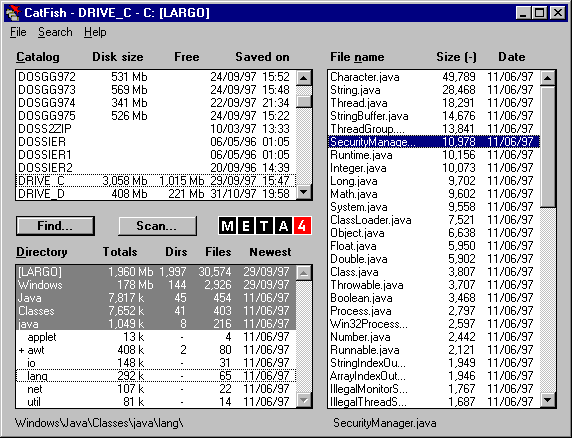
CatFish


Small, free and automatic disk inventory program for Windows. For people who can't remember what they put on their ZIP disks, floppies or CD-roms! We use it at Freebyte.


CatFish allows you to..
  • Save snapshots of all your disks and removable media (ZIP disks, CDROMs).
  • Quickly find files in all catalogs by name (with wildcards), size, and/or date.
  • See all total file and subdirectory counts as well as total space usage.
  • Easily view with any sort order. Export saved catalogs as text files.
  • Save any number of snapshots, for entire (network) drives or specific areas.


Friday, June 11, 2010

QuickTime Alternative (QT7) 3.2.2


QuickTime Alternative (QT7) 3.2.2

4.7 out of 5 stars


Windows 7/2003/2008/Vista/XP / Freeware / 2,074,000 downloads

QuickTime Alternative will allow you to play QuickTime files without having to install the official QuickTime Player. All QuickTime formats (.mov .qt .3gp etc.) are supported, including streaming content and QuickTime content that is embedded in webpages. Some advantages compared to QuickTime player are the quick and easy install, make an unattended installation, no background processes, use a player of your own choice, low on resources, and smaller size.


K-Lite Codec Pack 6.0.4


K-Lite Codec Pack 6.0.4


New version of K-Lite Codec Pack - a favorite with all the set of multimedia codecs and tools, which allows voproizvodit any video and audio from most popular to the very rare formats.

License:Free Ware - Free
OS:Win2000, WinXP, Win2003, WinVista
Author:KL Software
Date of publication:06/06/2010
Rating:   (Informer)


What does software mean ?

Computer software (also known as soft or program) is a general term used to describe a collection of computer programs, procedures and documentation that perform some tasks after being installed on a computer system. Without software a computer is practically unusable because hardware cannot communicate without software support. The soft may be classified in two major classes:  paid (commercial) programs and free (open source, GNU etc.) software. You can find here free reviews and advice about how to choose paid programs and free software.

Types of programs

Computer programs is divided into three major classes:

Password Recovery Bundle 2010 1.30


Password Recovery Bundle 2010 1.30

A complete suite of ElcomSoft password recovery tools allows corporate and government customers to unprotect disks and systems and decrypt files and documents protected with popular applications. Based on in-house tests as well as feedback from ElcomSoft valuable customers, these password recovery tools are the fastest on the market, the easiest to use and the least expensive.


Thursday, June 10, 2010

What is a Crack?

The word "crack" in this context means the action of removing the copy protection from commercial software. A crack is a set of instructions or patch used to remove copy protection from a piece of software or to unlock features from a demo or time-limited trial. There are crack groups who work together in order to crack software, games, etc. If you search for Real Player Crack, you will often see the word "crack" amongst the results which means it is the full version of the product.